

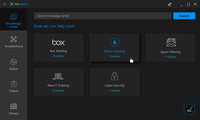
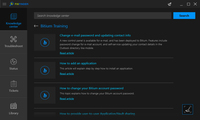
Users fail to adopt distant portals. FixFinder brings together articles from tools like Bloomfire, Sharepoint, and others right to the desktop. Many of our client's documents are poorly curated and mixed with other company-specific articles. Second, these 'remote portals' are distant locations that employees don't identify with and require separate credentials. The challenge is, how do you get users to adopt these resources before they open a ticket or make a call?

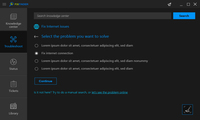
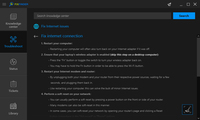
How many times are techs going to talk users through simple processes over the phone? Clearing a printer queue? Clean up temp files?
FixFinder has a custom troubleshooting wizard that techs design in the browser like a mindmap. Techs can program in a series of questions, and answers that guide the user to an optimal resolution. Users can execute scripts for repeatable tasks like fixes for printing, reset internet connections, or cleaning up a PC’s temporary files without calling, or opening a ticket.

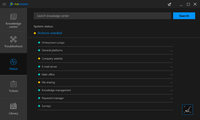
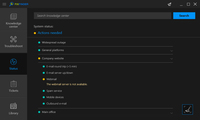
If the email server goes down, what do you do? Send an email? Major disruptions with cloud tools would initiate a flood of calls from confused end-users looking to report outages that we knew about, or receive ETAs on when the issues would be resolved. For companies with remote users, the problem was amplified as they couldn't simply walk around the office to check-in on other colleagues.


Ticketing Systems are distant portals that lack brand identity for the end-users. Need to open a ticket? Just go to our awesome portal, right? Wrong. Users fumbled over finding that location which is on www.MSPPage.com's front page under 'Client Login.' In many cases this isn’t realistic for folks who need help quickly or want a simple way to open tickets.

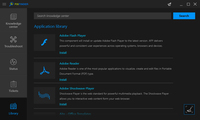
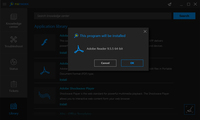
MSP tools are powerful but largely reactive and built for administrators. If a user needs an application the IT provider is happy to 'push' it after a ticket is logged, and a technician deploys it via an RMM tool. Users having to pull applications is a self-serving approach; however, the provider's tools are leaving users at the mercy of the administrators just for this simple task.
Put the knowledge users need right at their fingertips!
Users fail to adopt distant portals. FixFinder brings together articles from tools like Bloomfire, Sharepoint, and others right to the desktop. Many of our client's documents are poorly curated and mixed with other company-specific articles. Second, these 'remote portals' are distant locations that employees don't identify with and require separate credentials. The challenge is, how do you get users to adopt these resources before they open a ticket, or make a call?
Why not ask all of the easy questions before they call?
How many times are techs going to talk users through releasing and renewing a DHCP lease over the phone? Clear a printer queue? Clean up temp files?
FixFinder has a custom troubleshooting wizard that techs design in the browser like a mindmap. Techs can program a series of questions and answers that guide the user to an optimal resolution. Users can execute scripts for repeatable tasks like fixes for printing, reset internet connections, cleaning up a PC’s temporary files without calling, or opening a ticket.
Is it the user's system, or the cloud?
If the email server goes down, what do you do? Send an email? Major disruptions with cloud tools would initiate a flood of calls from confused end-users looking to report outages that we knew about, or receive ETAs on when the issues would be resolved. For companies with remote users, the problem was amplified as they couldn't simply walk around the office to check-in on other colleagues.
Users create, respond, and attach from the Desktop
Ticketing Systems are distant portals that lack brand identity for the end-users. Need to open a ticket? Just go to our awesome portal, right? Wrong. Users fumbled over finding that location which is on www.MSPsPage.com's front page under 'Client Login.' In many cases this isn’t realistic for folks who need help quickly or want a simple way to open tickets.
They don't need "admin" rights!
MSP tools are powerful but largely reactive and built for administrators. If a user needs an application the IT provider is happy to 'push' it after a ticket is logged, and a technician deploys it via an RMM tool. Users having to pull applications is a self-serving approach; however, the provider's tools are leaving users at the mercy of the administrators just for this simple task.
My journey with Managed Services started in the mid-2000s when I worked for up-and-coming MSP Provider in Boston, MA. It was an exciting time to adopt these remote tools to manage over a thousand end-users instead of traveling to cleint sites, and the business grew exponentially as the MSP model became adopted by companies all over the world.
In future years while running my own MSP, tools like Datto, Kaseya, and Autotask were revolutionizing the job. Still, we realized they failed to drive efficacy with the frontline by empowering the end-users. Users wanted fast, actionable answers, not phone numbers or external providers who hold all the power and knowledge in distant portals.
The early versions of FixFinder focused on syncing documentation from Knowledge Bases to the user's desktop. As the tool evolved, we added integrations for Ticketing, Custom Wizards, Status Page, and an Application Library. Our users can install applications, run scripts, receive alerts, and open tickets this using a Desktop Self-Help interface.
FixFinder’s ROI is clear since it integrates all the tools a user needs to interact with the provider. By creating a real front line at the desktop, you can lower inbound tickets, and free up your frontline to work with users who meet you halfway.
My journey with Managed Services started in the mid-2000s when I worked for up-and-coming MSP Provider in Boston, MA. It was an exciting time to adopt these remote tools to manage over a thousand end-users instead of traveling to cleint sites, and the business grew exponentially as the MSP model became adopted by companies all over the world.


Copyright © 2023 FixFinder
